Showing posts with label mega. Show all posts

Saturday, February 9, 2013

Stop Acting Like A Borg Machine: Use Encryption And Respect Your Private Life

freedom of the internet, digital bill of rights, constitution, organic farming

This morning Mikko “@mikko” Hypponen put out an encrypted tweet with the message indicating that you needed a TS/SCI with Poly clearance to read it. Dan “@dakami” Kaminsky followed up with the idea of possibly creating an encrypted tweet mechanism. Now there’s an idea… Right now companies like Twitter and Facebook make money off of the content we give to them. If there was an easy way to encrypt and decrypt that same content, could their business models fall apart?
mikko: ENCRYPTED TWEET Click To Read ==dHkgT3BlcmF0aW9ucyBDZW50ZXIgPHNvY0B1cy1jZXJ0Lmdvdj6JAa4EEAECAJgF== TS/SCI with Polygraph Clearance Required. ~
dakami: @mikko I actually wonder what would happen if I released an encrypted tweet mechanism. hmmmmmmmmmmmm ~
mikko: @dakami Remember to add text compression. ~
We don’t think Twitter and Facebook have anything to worry about though. Email encryption solutions have been around for more than 15 years but we’re pretty sure the number of messages you’ve ever encrypted can probably be counted on one hand. Plus we don’t see encrypting your tweets as being that necessary except for those one-off direct messages that you would rather Twitter not see.

Of course encrypting Twitter messages is something we’ve been able to do for a while. All you need is a local or web-based app that allows you to enter text, input a key, and push an encrypt/decrypt button. This technique isn’t very convenient though as you end up copying and pasting a lot of text back and forth all over the place. In search of a solution to ease this copy/paste exercise we started passively looking for more convenient options but then Petraeus happened (“Assuming Users Are Already Compromised” and “4 Steps to Anonymous & Secured Communication“) and suddenly this research seemed a lot more relevant.
Although we covered Wickr in the past and there have been some recent entries (e.g., Silent Circle from Phil Zimmerman of PGP fame), most of these apps require users to communicate over their proprietary systems. What we were particularly looking for was an encryption add-on to use over existing communication streams like Twitter and Facebook.

Of course the big issue with any encrypted communication system is key distribution. Products like Wickr and Silent Circle handle all of this complexity for us but you have to “trust” them. Back in the day some very smart people came up with the concept of Public Key Implementation (PKI) to solve the key distribution problem and over the years many have created tools to implement it. But for whatever reason though … PKI has never really taken off.

Any new system will undoubtedly have the same key distribution problems however some good options for specific niche groups may exist. Given that the infosec community may be one of those groups, we’ve come across a few good solutions ranging from the less convenient to nicely integrated systems that we’d like to share. But before we mention them we’d like to hear from you. Do you know of any workable Twitter encryption tools? We’ve pointed out a few down below in the closing signature to get you started…
#####
Have any tools that you use to encrypt tweets? Let us know in the comments below. Today’s post pic is from PlexusProject.org (one of the many great Twitter encryption projects out there). Also @mikko mentioned one on Twitter recently. See ya!

In part I of this topic we introduced the concept of encrypting your tweets and mentioned the possibility that an easy-to-use Twitter encryption system could impact their revenue model. Of course this isn’t going to happen as in general people are lazy, which is the same reason why email encryption services haven’t taken off. There are some convenient solutions like Wickr and Silent Circle but they require you communicate over their proprietary systems and not an already established stream like Twitter or Facebook.

We’ve already hinted at two possible encryption/decryption tools, CryptTweet, and AnonTwi, but what else could be out there? Here is a short list of everything we and you all helped us find.
  • CryptTweet: Group of Python scripts designed to encrypt direct messages (DM); uses RSA public-key crypto (more info)
  • AnonTwi: Complete Python-based framework for not only encrypting content but also routing through TOR; distributed and open source but requires user to manage keys (more info)
  • Encrypt Facebook: Chrome extension that allows you to encrypt Twitter content as well; not centralized but must choose random key share with desired parties (more info)
  • Encipher.it: Bookmark-based encryption; not centralized but requires users to choose and share a random key with others; software is open source (more info)
  • Priv.ly: Content stored on server and linked to with a priv.ly link; browser plugin allows users to select link to expand the message in place; servers are open source and can be implemented in a distributed manner (more info)
  • Scrambls.com: Free version for automatically encrypting/decrypting content any place on the web; iOS app for use on Twitter; keys held on Scrambls server; commercial version offers corporate key servers (more info)
Encrypt Facebook, AnonTwi, and Encipher.it are a little harder to work with since you have to manage your own keys. Out of these three AnonTwi looks the most promising but for right now our recommended choice is probably Encipher.it.

Out of the remaining two, Priv.ly seems like the best solution due to its public key structure and open source servers. Unfortunately, the project is still in an alpha state and doesn’t look to be too usable at this time. They developers detailed their future plans in a  blog post in early November so we hope they have a bright 2013.
That leaves Scambls as the best option in our opinion for now. It would be nice if there was an open source key server that used a public key structure. That way the owner of any key server wouldn’t be able to access the messages assuming only the user holds the private portion of the key.

If anyone is interested in testing this service out, we’ve created a Scambls group called NovaInfosec just to see how it works. Contact us if you’d like to be added. And be sure to checkout their iPhone/iPad version for when on the go.

Sunday, January 27, 2013

MEGA's First Week - A Retrospective - Future Is Open Source

how to create an account using mega 50gb free storage

January 26th 2013


It's been seven busy days for us since MEGA went live. As millions of users were hitting 50,000 freshly written and barely tested lines of code and dozens of newly installed servers, teething troubles were inevitable - it took us almost 72 hours to resolve the major bottlenecks, and we would like to apologize to all users who were affected.

As expected, the public debate about MEGA revolves primarily around our cryptographic security model and can be classified into five categories:
  • Actual bugs. Two (an XSS hole and the invalid use of CBC-MAC as a secure hash) were reported by the community so far and fixed swiftly. To all the bright minds going through our amorphous code: Thank you for your efforts! We will make our JavaScript more readable and launch a bug bounty program shortly.
  •  
  • Design flaws exacerbating the potential impact of weak user passwords. We acknowledge that our current approach is based on the assumption that all of our users choose strong passwords, which is probably a bit naive. We are going to improve the sign-up interface (better user education and rejection of overly weak passwords). We'll also reduce the offline password cracking risk for users who do use weak passwords and fall victim to someone intercepting their e-mail or obtaining their user record from our central database.
  •  
  • Weak random number generation: We have added WebKit's crypto.getRandomValues() into the mix and will collect mouse/keyboard timing entropy explicitly before generating the RSA key pair rather than informing the user that we are doing so only after the generation has already started.
  •  
  • Deduplication - clause 8 of our Terms of Service has caused some confusion and concern. The reality is quite harmless: We deduplicate based on the full encrypted file. That's it.
  •  
  • Polemic in the "if you can break SSL, you can break MEGA" category. No comment.

Mega Winner: The cloud storage market is dominated by players that do not take advantage of cryptography beyond HTTPS and server-side encryption.

freedom free journalists stage 1024 encryption

A word on cryptography

January 22nd 2013The cloud storage market is dominated by players that do not take advantage of cryptography beyond HTTPS and server-side encryption. Since we set out to improve this rather dissatisfying situation three days ago, some news outlets have made attempts to dismantle our crypto architecture. Frankly, we were not too impressed with the results and would like to address the points that were raised:
ars technica: "Megabad: A quick look at the state of Mega's encryption"

"The key used to encrypt your Mega files and folders is stored on Mega's servers, rather than on your local computer."

This is correct - the only key that MEGA requires to be stored on the user side is the login password, in the user's brain. This password unlocks the master key, which in turn unlocks the file/folder/share/private keys.

"It is telling that there appears to be no password recovery mechanism anywhere in the Mega or log-on screens, nor any method of changing your password in the user control panel." Because the master AES-128 key is encrypted using your password, remembering the password is vital. Losing it means you don't just lose the ability to log on to the service - you lose the ability to decrypt your files, period.

This is correct (and comes as no surprise) - however, this will change in the near future:
  • A password change feature will re-encrypt the master key with your new password and update it on our servers
  • A password reset mechanism will allow you to log back into your account, with all files being unreadable. Now, if you have any pre-exported file keys, you can import them to regain access to those files. On top of that, you could ask your share peers to send you the share-specific keys, but that's it - the remainder of your data appears as binary garbage until you remember your password.
"Without adding entropy, the "random" primes generated by math.random for use as RSA keys are really only pseudo-random and can be guessed."
This is correct - and quite a strange statement to make after conceding that mouse and keyboard entropy are indeed used to enhance Math.random(). We will, however, add a feature that allows the user to add as much entropy manually as he sees fit before proceeding to the key generation.

[On deduplication] "Whatever the underlying method, the fact that block deduplication exists is a blow against the "see no evil" approach taken by Mega."

Fact #1: Once this feature is activated, chunk MACs will indeed be stored on the server side, but they will of course be encrypted (and we will not use ECB!). Fact #2: MEGA indeed uses deduplication, but it does so based on the entire file post-encryption rather than on blocks pre-encryption. If the same file is uploaded twice, encrypted with the same random 128-bit key, only one copy is stored on the server. Or, if (and this is much more likely!) a file is copied between folders or user accounts through the file manager or the API, all copies point to the same physical file.

Forbes: Researchers Warn: Mega's New Encrypted Cloud Doesn't Keep Its Megasecurity Promises
"So Mega, or anyone else who gains control of the Mega server sending the crypto algorithms, can turn off that encryption or steal the user's private key, which would allow decryption of all past and future uploads."

Correct. Fact #1: Our FAQ states exactly that and warns people that do not trust us to refrain from logging into the site (but they could, in theory, still safely use MEGA through client apps from vendors they trust). Fact #2: Any software maker offering online application updates is able to plant Trojan code into specific targets' computers, with much more far-reaching consequences.

"If you can break SSL, you can break MEGA."

Yes. But if you can break SSL, you can break a lot of things that are even more interesting than MEGA.

"To make matters worse, Mega's SSL server seems to use weak 1024-bit encryption, rather than the 2048-bit encryption considered the minimum standard by many cryptographers for a decade. (This 2004 study, for instance, that declared 1024-bit keys would only be secure until 2006.)"

Fact #1: https://mega.co.nz/ uses 2048-bit encryption. Fact #2: https://*.static.co.nz/ uses 1024-bit encryption. Fact #3: All active content loaded from these "insecure" static servers is integrity-checked by JavaScript code loaded from the "secure" static server, rendering manipulation of the static content or man-in-the-middle attacks ineffective. The only reason why HTTPS is supported/used at all is that most browsers don't like making HTTP connections from HTTPS pages. And, using more than 1024 bit would just waste a lot of extra CPU time on those static servers. Fact #4: This has been covered in our FAQ from the beginning.

John Hopkins cryptographer professor Matthew Green says that Mega's claims of a Javascript verification system "make no sense." ... "If the Javascript is verifying itself, it's like trying to pick yourself up by our bootstraps, which doesn't work," says Green. "You need something trusted on the user's machine to check the Javascript, and they don't have that."

Please do not rely on hearsay, even if you are a cryptographer professor. Instead, go to the actual site and look at the actual code. Fact #1: The JavaScript is not verifying itself. Fact #2: A piece of JavaScript coming from a trusted, 2048-bit HTTPS server is verifying additional pieces of JavaScript coming from untrusted, HTTP/1024-bit HTTPS servers. This basically enables us to host the extremely integrity-sensitive static content on a large number of geographically diverse servers without worrying about security.
MegaCracker An excellent reminder not to use guessable/dictionary passwords, specifically not if your password also serves as the master encryption key to all files that you store on MEGA.

top cloud storage alternatives dropbox


 Development roadmap

January 18th 2013Time flies when building a website, and unfortunately, half of the launch feature list that we envisioned when we started implementing MEGA back in September has now turned into a post-launch development roadmap. These are the essentials that we will work on next:
Developer documentation enhancements:
  • Properly reformat and comment the JavaScript reference implementation so that it becomes more readable
  • Add missing command-specific documentation to the API reference
File transfer queue enhancements:
  • Vertical resizing
  • Drag & Drop to modify transfer sequence
  • Multiselect
  • Clicking on a pending transfer navigates to/marks the source file or the target folder
  • Stop/continue buttons
File manager enhancements:
  • Re-implement from scratch without underlying third-party UI framework for better performance
  • Adaptively eliminate the leftmost file path buttons at the top to maintain visibility of the upload and search buttons (we have a hack in place for this, but it only works in Chrome)
  • "Properties" option in the file context menu
Collaboration feature enhancements:
  • MEGA user-to-user messaging with file attachments, plus external RFC 4880/OpenPGP and S/MIME gateway for secure off-site e-mail communication
  • MEGA user-to-user instant messaging
  • Exported link enhancements
  • Allow for the creation of folder links (with associated crypto key) which then display the folder content live
  • Secure unauthenticated delivery web widget
  • Allow unauthenticated users to securely deliver files to MEGA users' inboxes, e.g. to submit very large files to print shops
Filesystem enhancements:
  • Activate storing all block MACs on the server (encrypted) after an upload to allow for integrity-checked partial reading. Right now, the file has to be downloaded fully to be checked.
  • Enable forking encrypted time-stamped delta file support to allow for random writing to existing files with full rollback capability
SDK enhancements
  • Complete the API documentation
  • Provide client libraries in various languages
Client applications
  • A Windows filesystem mount is currently in beta and will be available shortly
  • Linux/MacOS X filesystem mounts
  • Mobile access
  • Sync tools for all major platforms
Integrated on-site applications
  • Calendar
  • Word processing
  • Spreadsheet
MEGA as a local "appliance"
  • Load a third-party audited version of the MEGA JavaScript files from a machine that you control
  • Be immune against new bugs of any kind

Kim Dotcom wants to encrypt half of the Internet to end government surveillance (RT INTERVIEW) Mega Former Megalupload IS Pushing Browsers To It's Limits

the battle for internet privacy


MEGA pushes the browser to its limits, and these limits vary. While it does work with all major current browsers, there are some weighty feature and performance differences:

Google Chrome: The leading browser, by far. It implements the proposed HTML5 FileSystem API, allowing for fancy features such as recursive folder uploads and efficient downloads. Caveats: Requires user permission to batch-write files after a few unattended completed downloads (for security reasons, and only once per session). Slightly anaemic text rendering.

Internet Explorer 10: A solid, modern browser with blazing JavaScript performance (even exceeding Chrome's). However, until Microsoft fixes a memory leak in the Blob saving functionality, you have to close and reopen the MEGA tab every couple of hundred megabytes of inbound file transfer. And, until Microsoft implements disk-based Blobs or Chrome's FileWriter API, memory usage for a file download peaks at twice the file's size - hardly efficient.

Mozilla Firefox 18: Carefully avoids providing any API that would allow writing files from JavaScript.

Safari 6: No JavaScript file writing, either.

Internet Explorer 9: Lacks all essential features required for MEGA: File I/O, Web Workers, ArrayBuffers, and binary cross-domain HTTP access. Nice text rendering, though.

Opera: No JavaScript file writing and exceedingly slow JavaScript crypto operations.
Conclusion: If you are planning on using MEGA frequently, there is currently no alternative to using the most advanced browser currently in existence - Google Chrome.

Sunday, January 20, 2013

''No one shall be subjected to arbitrary interference with his privacy, family, home or correspondence. Everyone has the right to the protection of the law against such interference.'' - Human Rights Declaration


In less than 10 minutes, you can drastically improve your privacy online and protect yourself against unwanted and invisible tracking.
Note that these privacy safeguards will also be blocking some ads. EFF is working with online advertisers to try to convince them to provide real privacy protections for users, but until they agree to meaningful standards about online tracking, these steps will be necessary for users to safeguard their browsing privacy. Aside from removing ads, these changes won't affect your browsing experience on the vast majority of websites. It's possible, however, that a tiny fraction of websites may behave differently or break, in which case the easiest solution is to temporarily use a "private browsing" mode without the settings enabled, or a fresh browser profile/user with default settings.
Firefox instructions Chrome instructions

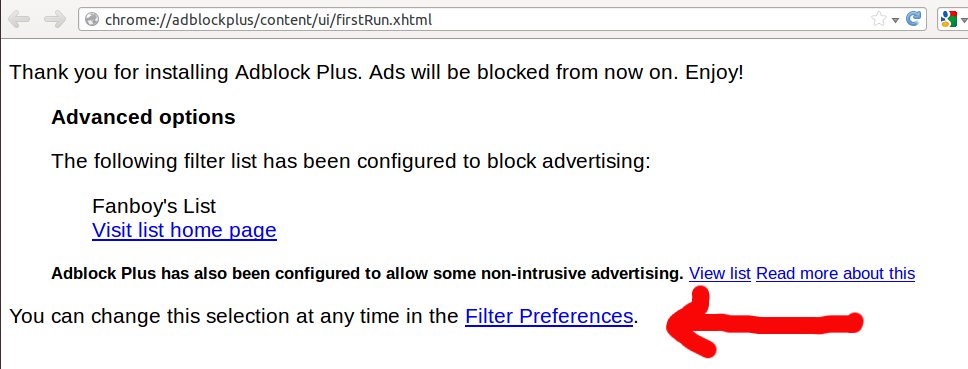
Step 1: Install Adblock Plus

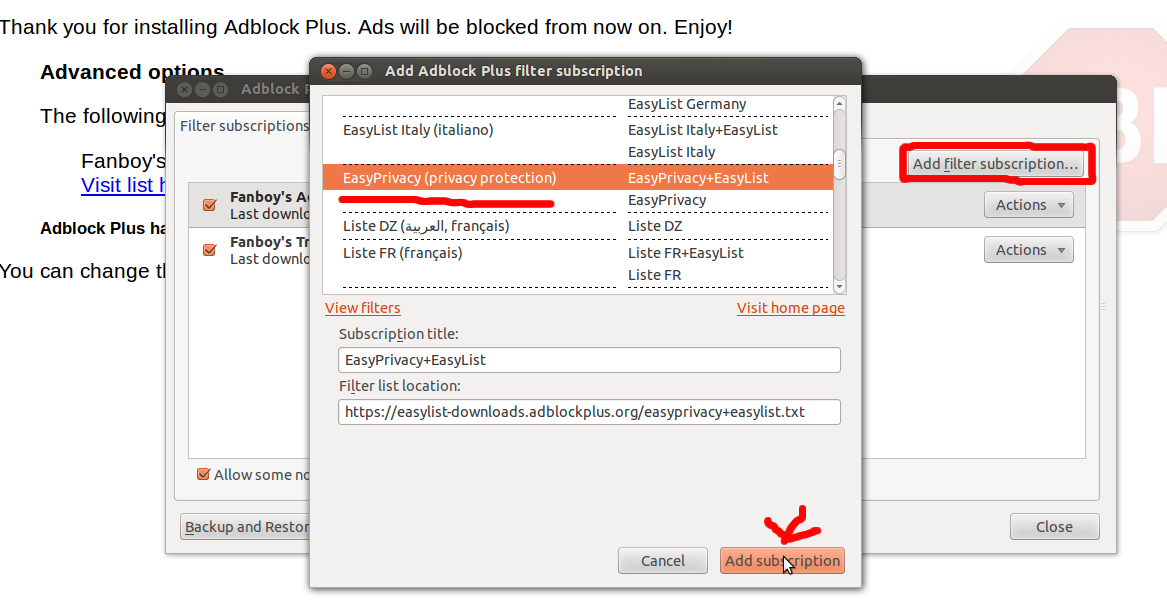
Get Adblock Plus. After it is installed, be sure to change your filter preferences to add EasyPrivacy:
Then go to "Add Filter Subscription" -> "Add a different subscription" and select "EasyPrivacy":

Step 2: Change Cookie Settings

Now you are going to set your cookies to expire when you exit your browser, and disallow third-party cookies from being set. To do this, go to Edit -> Preferences -> Privacy. Under "History", choose the drop down "Use custom settings for history". Under "Accept cookies from sites", uncheck "Accept third-party cookies", and right below select "Keep until I close Firefox":
Great! No more unwanted tracking cookies.

Step 3: Turn Off Referers

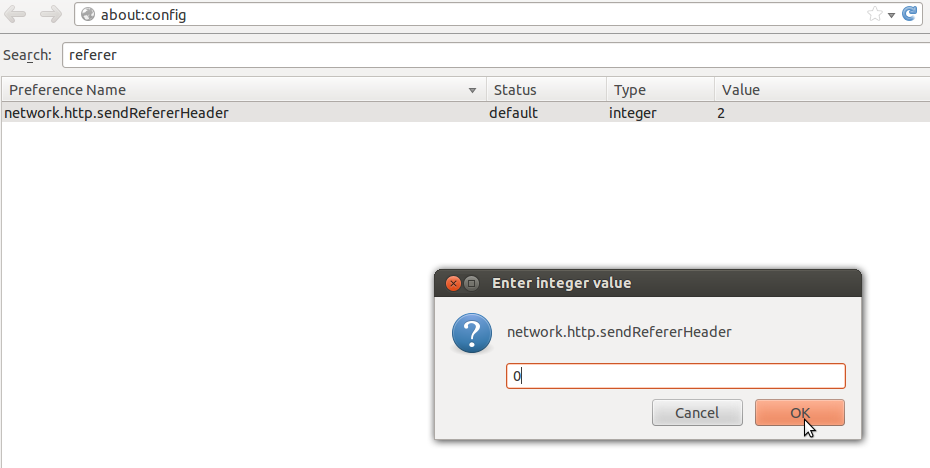
This famously misspelled header typically sent by default with every HTTP request gives a lot of potentially personal information to websites. But you can turn it off. Open a new tab and in your URL bar, type "about:config". You will see a scary warning; click "I'll be careful, I promise!" At the search bar, type "referer". You should see the value "network.http.sendRefererHeader". Double click it, and change the value to 0:
Ta da! No more referers. Now close that tab if you are worried about accidentally changing other settings.

Step 4: Install HTTPS Everywhere

Install EFF's browser add-on HTTPS Everywhere. This maximizes your use of HTTPS to ensure that your private conversations with websites can't be snooped on or tampered with by other parties.
Congratulations! You are now in an elite group of users fighting back against unwanted privacy invasions. Give yourself a pat on the back, and then please share these tips.

Step 1: Install Adblock Plus

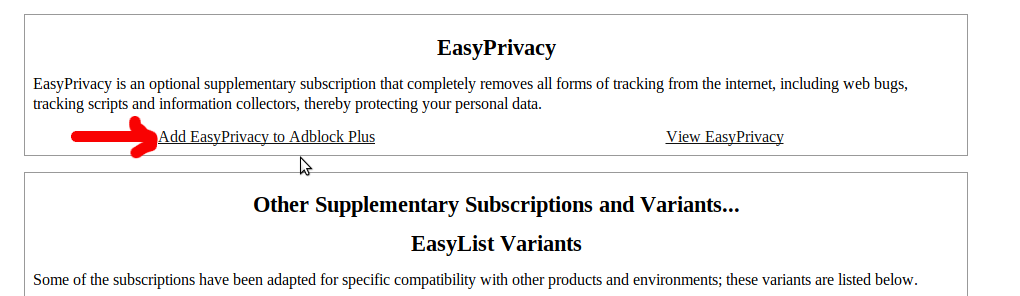
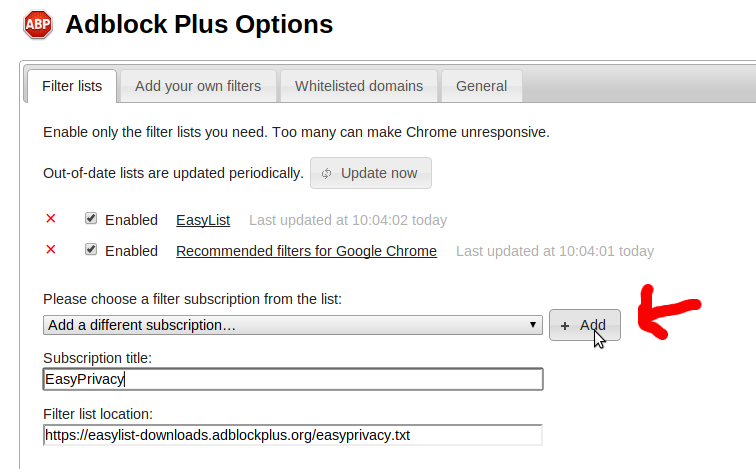
Get Adblock Plus. After it is installed, be sure to change your filter preferences to add EasyPrivacy. To do this, first visit the AdBlock Plus website. Click on the link to "Add EasyPrivacy to Adblock Plus":
This should take you to the Adblock Plus options screen. Simply click add and you're all set:

Step 2: Change Cookie Settings

Now you are going to set your cookies to expire when you exit your browser, and disallow third-party cookies from being set. To do this, locate the Chrome settings menu, which should one of the following two icons in the top right of your browser:
or
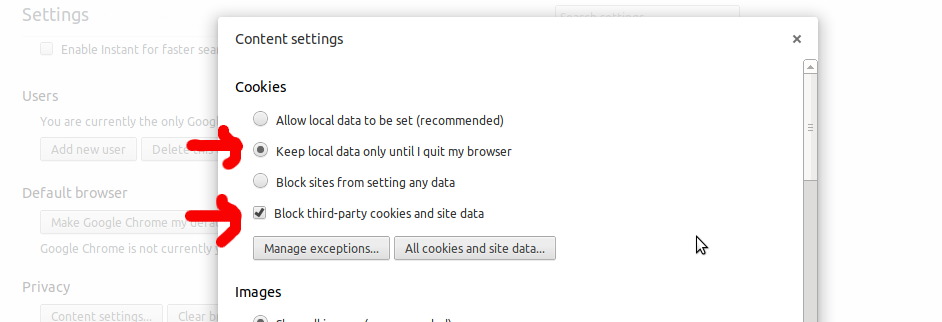
From this menu, go to "Settings", and scroll to the bottom and click "Show Advanced Settings." Under "Privacy", click "Content Settings". Select "Keep local data only until I quit my browser / for current session", and check "Block third-party cookies and site data":
Great! No more unwanted tracking cookies.

Step 3: Turn Off Referers

This famously misspelled header typically sent by default with every HTTP request gives a lot of potentially personal information to websites. But you can turn it off. To do so, install the extension Referer Control . After installing, scroll down and locate the text "default referer for all other sites" and click "Block":
Ta da! No more referers.

Step 4: Install HTTPS Everywhere

Install EFF's browser add-on HTTPS Everywhere. This maximizes your use of HTTPS to ensure that your private conversations with websites can't be snooped on or tampered with by other parties.
Congratulations! You are now in an elite group of users fighting back against unwanted privacy invasions. Give yourself a pat on the back, and then please share these tips.

And One More Thing: Install Ghostery 

Related Posts Plugin for WordPress, Blogger...